Codayak — the free AI coding workbench for .NET dev teams

A free development sidekick for .NET dev teams: scopes the blast radius, builds, tests, checks your standards and proves each change — works with your DevOps process.

Available from the Microsoft Store or on GitHub · Windows 10 (1809+) / Windows 11 · free for personal and commercial use

Codayak

See it in action

Two and a half minutes: ticket to user story, blast radius, build, 3,197 tests, trust report, browser and SQL, PR review.

What is Codayak?

Codayak is a free Windows AI coding workbench — a development sidekick for .NET software teams: it reads your whole repo, scopes the blast radius of a change, writes and builds the code, runs your tests and SQL, checks your coding and UI standards, and proves the change works — inside your Azure DevOps or GitHub process, using your existing LLM provider API keys. Made by Techniche Labs Pty Ltd in Queensland, Australia. What sets it apart is the Trust Engine — it builds, tests, security-scans and spec-checks its own output and reports a confidence-scored trust band, so you know what it actually did before you rely on it. Free for personal and commercial use; not open source.

See how it compares with Cursor, Copilot, Claude Code, Cline and Windsurf.

Codayak — Code Orchestration & Development Assistant: Your Automation Kit

What it actually does

Ask for a change; Codayak writes it, builds it, tests it — and shows you the evidence before you rely on it.

📋Clear work before code

Reads the Azure DevOps or GitHub work item, the wiki and the spec. Give it a one-line ticket and it drafts a user story with Given/When/Then acceptance criteria, names the files involved and lists open questions for the stakeholder.

🧠Knows the blast radius

Maps every project, type, member and dependency in your solution, then shows what a change touches before anything is edited: the call sites, the files, and whether tests cover them. New starters can see a change's impact on day one.

✍Writes and patches code

Surgical find/replace, line-range and between-marker edits instead of rewriting whole files. Every write is backed up first, shown in a side-by-side diff and can be rolled back with one command. Nothing is written until you turn on Write to Repo.

✅Verifies its own work

The Trust Engine builds, tests, security-scans and spec-checks the output, then reports a trust band, a 0–100 score and a seven-aim status with per-checker evidence. Checks are scoped to the files you changed and what depends on them.

🔍Reviews pull requests

Line-by-line review on Azure DevOps and GitHub under your team's rules. It reads the full changed files, not just the diff, posts each finding on its line with the fix, and stays comment-only unless you ask it to vote.

🔨Compiles and tests

Builds with MSBuild or the dotnet CLI, including legacy ASP.NET projects, runs your tests and reads the failures, runs the app and scaffolds xUnit, NUnit or MSTest projects — so it fixes what it broke instead of handing you a guess.

🗄Runs real SQL

Executes against SQL Server, PostgreSQL, MySQL/MariaDB, SQLite or Oracle to query, inspect and test the database code it just wrote. Writes stay behind the Write to Repo switch, and it asks before touching a database on its own initiative.

🌐Drives a real browser

Opens real Chrome, snapshots the page, then clicks, types and waits its way through the flow to verify the UI it changed. Screenshots are saved to disk, and credentials pass as placeholders, never plain text.

🖥Drives Windows apps

Attaches to a WPF, WinForms or Win32 app via UI Automation, or launches it from its .exe, then clicks, types and presses keys to exercise the controls it just built and screenshots the window to check the result.

📚Learns from its failures

Distils durable lessons from repeated failures, their fixes and your corrections into a local memory, then surfaces the relevant one before you hit the same wall twice. Say "remember this" and it stores the lesson on the spot.

🏗Builds whole projects

Hand it a project to scaffold and it plans the file manifest, generates every file in dependency order across parallel worker sessions and retries failures — optionally verifying each phase, and resuming where it left off if you stop.

🎨Makes pictures, video and speech

Four image providers with reference-image editing and masked region edits, text-to-video, video analysis, and text-to-speech and speech-to-text across five speech providers, including a hands-free Conversation Mode you can talk to and interrupt.

🧭Runs a research panel

Fans one hard question across up to ten worker LLMs, each with a different framing — simplest solution, failure modes, first principles, the steelmanned opposite — then hands every perspective back to be judged by the main model.

🔌Seven cloud providers, or your own endpoint

Anthropic, OpenAI, xAI, Google, MiniMax, Moonshot and Zhipu — using your existing LLM provider API keys, switchable mid-conversation — or any OpenAI-compatible endpoint (Ollama, LM Studio, vLLM). No reseller sits in between.

⚡Prompt-cache control

On Anthropic, Codayak places the prompt-cache breakpoints itself, so your system prompt, tools and history are read from cache round after round instead of re-sent at full rate. Every provider's cache hit rate is logged.

📏Context-window management

Codayak tracks how full the model's window is after every step. It never re-reads a file already in the conversation, reclaims used tool output, compacts older exchanges and stops cleanly before the limit. Every threshold is a setting.

👥Team Mode

Several Codayak instances on your LAN collaborate on one goal over an encrypted link — planner, coders, reviewer — each on its own model. Peers can hold different repositories, so one team can change an app and its API together.

🗒️Session continuity

Restore Session distils your saved conversations into a compact summary that rides along with every message, so you can pick up a task days later without re-explaining. Each day's new conversation is folded in incrementally.

What's new in Codayak 1.7.0

Now on GitHub and, for the first time, the Microsoft Store. Full details in the 1.7.0 release notes.

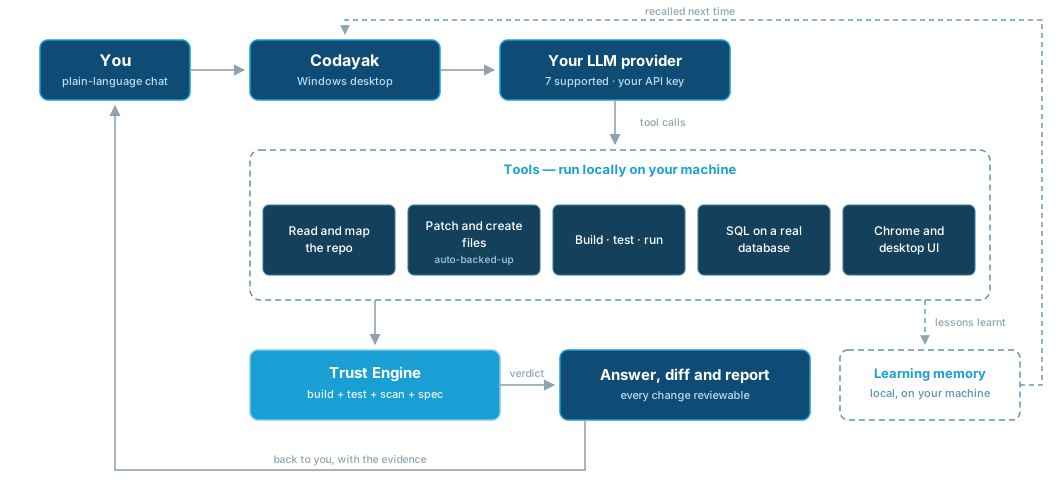
How a request flows

Your message goes to the model you chose; the model calls tools that run on your machine; the Trust Engine checks the result; the verdict and the diff come back to you.

Diagram: your plain-language message goes to Codayak on your desktop, which calls your chosen LLM provider; the provider requests tools that run locally to read the repository, patch files, build, test, query databases and drive user interfaces; the Trust Engine then verifies the result and the answer, diff and report come back to you, with lessons written to a local learning memory.
1

You ask

Plain-language chat in the Codayak desktop app.

2

Your provider

Works with the LLM provider you already use — seven cloud providers, or any OpenAI-compatible endpoint including local models.

3

Tools run locally

Map the repo, patch files, build, test, query the database, drive the UI.

4

Trust Engine

Build, test, security scan and spec-compliance check on the result.

5

You get proof

The answer, the diff and a confidence-scored report — with lessons stored for next time.

Why it's different

It verifies instead of hoping

Most assistants generate plausible code and hand it over. Codayak can build it, test it, scan it and spec-check it, then give you a trust band and the evidence behind it.

It remembers between sessions

Lessons from what broke and what fixed it are stored locally and surfaced on future turns — you explain a convention once, not every session.

It sees the whole codebase

A tiered repo map plus dependency-aware retrieval means it changes a thing consistently everywhere, not just in the file in front of it.

Nothing changes without a trail

Auto-backup before every write, a side-by-side diff, and one-command rollback. The Write to Repo switch is off until you turn it on.

It works as a team

Codayak instances on your LAN can form a leader/specialist team — the leader plans the work, farms tasks out to peers running their own models, and reviews the results. Each peer can run a different LLM — leader on Anthropic, specialists on OpenAI, Google or xAI — so one team can mix providers on a single task. Encrypted peer-to-peer, no cloud relay.

It drives what you drive

It doesn't stop at writing code — it compiles with MSBuild, runs your test suite, executes SQL against your database, and clicks through your web or desktop UI to test it. It even files the PR review comments in Azure DevOps or GitHub.

Frequently asked questions

Is Codayak free?

Yes. Codayak is free for personal and commercial use under a proprietary freeware licence. There is no trial, no seat limit and no paid tier. You pay your LLM provider directly for the tokens you use. It is not open source.

How much does Codayak cost to run?

Codayak is free. It uses your existing LLM provider API keys, so you pay your provider's published rate for the tokens you use — there is no subscription, no metering and no reseller margin. It works to send fewer tokens: prompt-cache management, context protection that never re-reads a file already in the conversation and reclaims tool output it has already used, a skeleton repository map on large solutions, an optional cheaper worker model for background jobs, and verification kept inside token budgets you set.

Can I use a local or in-house model such as Ollama, LM Studio or vLLM?

Yes. Codayak can talk to any OpenAI-compatible chat-completions endpoint — a local Ollama or LM Studio server, vLLM, or your organisation's own gateway — so your code never has to leave your network. In Settings → LLM Providers, enter the full chat-completions URL in the Base URL field of the MiniMax, Moonshot or Zhipu provider (for example http://localhost:11434/v1/chat/completions for Ollama, or http://localhost:1234/v1/chat/completions for LM Studio), add your model's id in Settings → Chat Models, and select it from the toolbar. How well it performs depends on how well the model you run handles tool calls. Dedicated local-model settings are coming in the next release.

Does Codayak run on Windows? What about Mac or Linux?

Codayak is a native Windows desktop application for 64-bit Windows 10 (1809 or later) and Windows 11. The .NET runtime is included, so there is nothing extra to install. There is no Mac or Linux version.

Does Codayak only work with .NET?

No. Codayak is built for .NET teams, but it reads, writes and reviews code in any language your LLM understands, including JavaScript, TypeScript, Python and SQL. It runs SQL against five database engines, tests web and Windows desktop UIs, and reviews pull requests in Azure DevOps and GitHub whatever the language. Building, running tests and the Trust Engine's build and test verification are tuned for .NET today.

Which AI models and providers does Codayak support?

Uses your existing LLM provider API keys across seven cloud providers — Anthropic, OpenAI, xAI, Google, MiniMax, Moonshot and Zhipu — or any OpenAI-compatible endpoint including local models. You can switch model — or provider — in the middle of a conversation without losing it. Codayak is not a reseller: nobody sits between you and your provider. A "Fetch Latest" button pulls each provider's current model list, so new models are usable as soon as they ship.

Does Codayak work with Visual Studio and .NET projects?

Yes. Codayak reads .sln and .csproj structure, builds with MSBuild or the dotnet CLI (including legacy ASP.NET projects that need full MSBuild), runs your tests with dotnet test, scaffolds xUnit/NUnit/MSTest projects and runs your app. It works alongside Visual Studio rather than replacing it — it is not an editor.

How does Codayak verify its own work?

The Trust Engine runs after generation: it builds the code, runs the tests, performs a security scan and, when you supply a specification, checks that every required feature is present and wired up. It then reports a trust band (High / Moderate / Low), a confidence score, per-checker evidence and recommendations. Every report is saved to the repository's .coda/verification/ folder as an audit trail.

Can Codayak run my unit tests and SQL?

Yes. It runs dotnet test and reads the results, and it executes SQL against SQL Server, PostgreSQL, MySQL/MariaDB, SQLite and Oracle to query data, inspect schema or test the database code it just wrote. Database writes are gated behind the same Write to Repo switch as file writes, and Codayak asks before touching a database on its own initiative.

Can Codayak test a user interface?

Yes — two ways. It opens a real Chrome browser, snapshots the page's interactive elements, clicks and types through a flow and waits for results. For Windows desktop applications (WPF, WinForms, Win32) it attaches via UI Automation and exercises the controls. Credentials pass as placeholders and are never typed in plain text.

Is my code sent anywhere other than my LLM provider?

No. Codayak runs on your machine with no account and no server. Your code, prompts and keys go only to the LLM provider you configured. Learning memory is embedded on-device and stored in a local SQLite file. The only thing Codayak itself sends is a once-a-day update check carrying a random install identifier and the version number.

Can Codayak change files without my permission?

Not until you turn on the Write to Repo switch, which is off by default. When it is on, every write is backed up first to .coda/backups/, shown in a side-by-side diff, and can be rolled back with one command. Reference repositories, directories and wikis you attach are read-only by construction.

How is Codayak different from Cursor, GitHub Copilot or Claude Code?

Cursor and Windsurf are editors (VS Code forks); Copilot is an editor extension; Claude Code is a terminal tool. Codayak is a standalone Windows workbench that sits beside your editor. The practical differences are that it verifies its own output with a confidence-scored report, runs real SQL and drives real browser and desktop UIs to test what it built, reviews pull requests under your team's rules, and works with the LLM provider you already use across seven cloud providers with no intermediary, or any OpenAI-compatible endpoint including local models.

What is Team Mode?

Several Codayak instances — on one machine or across your LAN — form an encrypted leader/specialist team. The leader plans the work, delegates tasks to peers (each running its own model and provider), and reviews the results. Peers can hold different repositories, so one team can work on an app and the API it depends on at the same time. Traffic is end-to-end encrypted (Ed25519 identity, X25519 key exchange, AES-256-GCM, TLS with certificate pinning) with no cloud relay.

Windows shows a SmartScreen warning when I run the installer. Is it safe?

The installer is signed by TECHNICHE LABS PTY. LTD. If Windows asks you to confirm, choose More info → Run anyway. SmartScreen is only flagging it because there isn't a large number of installs yet.

Download Codayak

Available from the Microsoft Store or on GitHub · Windows 10 (1809+) / Windows 11 · free for personal and commercial use

Latest version: 1.7.0 · Release notes · All releases

By installing Codayak you accept the End User Licence Agreement.
Requires 64-bit Windows 10 (1809+) or Windows 11 and an API key for at least one supported LLM provider.

Live figures, refreshed hourly. GitHub downloads are independently verifiable on GitHub.

— Downloads
— Active users (last 30 days)
— Active users now

Licensing and enquiries

Free for personal and commercial use. You may not redistribute, modify or reverse-engineer it. Provided "as is", with no warranty. The full End User Licence Agreement is shown during installation and inside the application at any time.

Want priority support, procurement paperwork, or a hand rolling Codayak out to your team? Contact us — we're a software house, and we're happy to talk.

Featured on There's An AI For That Codayak on SaaSHub — approved